MES & ERP
What is an MES system? Functions, MES vs ERP, MES integration with ERP and rollout steps
What an MES system is and what it does: its core functions, its place in ISA-95, MES vs ERP and SCADA, how MES integrates with ERP and how to roll it out.
Volkan Alkılıç ·
Our clients
- Siemens

- Anadolu Isuzu

- BSH

- Tofaş

- Toyotetsu

- Martur

- Turkcell

- Vodafone

- Doğadan

- Pakmaya

- Bross

- Abdi İbrahim

- Nobel İlaç

- Plastimak

- Dalgıç Kalıp

- Barbaros Motor

- Magneti Marelli

- Rözmaş

- Sanel

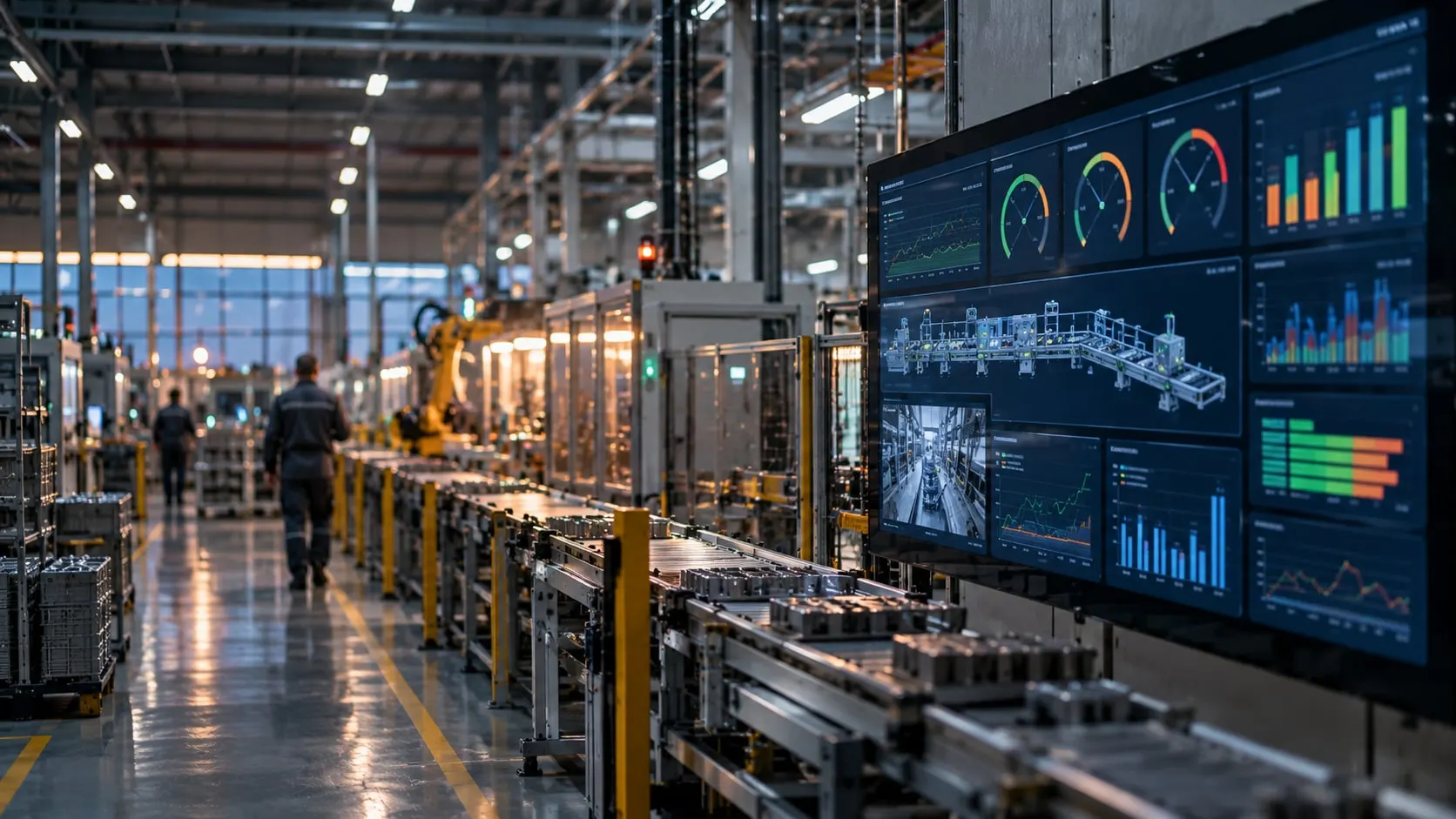
An MES (Manufacturing Execution System) is the software layer that manages and records, in real time, how the production planned in the ERP actually happens on the shop floor. It shows which work order is running on which machine, how many good and bad parts were made, when and why the machine stopped, and which material went into which batch. The ERP answers “what will we make”; the MES answers “how did we make it, and what is happening right now”.
This guide explains what an MES system is, what it does, how it differs from ERP and SCADA, where it sits in the plant and how an MES rollout runs. The aim is to help you judge whether your plant needs one.
What MES stands for, in short
MES stands for Manufacturing Execution System. The applications plants call a “production tracking system” or “production monitoring software” cover the core MES functions.
In short, an MES:
- takes the work order from the ERP to the machine and the operator,
- records actual production by machine, work order and shift,
- reports the actual quantity, time and consumption back to the ERP.
An MES does more than report; it helps people decide while production is still running. It raises an alert when a stop runs long, blocks the job when the wrong material is scanned, and shows the line that is behind target before the shift ends.
What does an MES do? Core functions
One of the most cited references for the scope of an MES is the set of eleven functions MESA International published in 1997, known as “MESA-11”. Not every MES product offers all of them, but the list is a good way to check which functions a product covers:
| Function | What it means on the floor |
|---|---|
| Resource allocation and status | Live status of machines, molds, fixtures and people |
| Detailed scheduling | Sequencing work orders on machines |
| Dispatching production units | Sending the job to the machine and the operator |
| Document control | The right version of work instructions, recipes, drawings and control plans at the station |
| Data collection | Counts, states and process values from the machine; downtime and scrap reasons from the operator |
| Labor management | Who worked on which job, for how long |
| Quality management | Measurement records, nonconformances, SPC |
| Process management | Monitoring recipes and process parameters |
| Maintenance management | Failure records, planned maintenance, MTBF and MTTR |
| Product and batch traceability | Which batch was made from which raw material, on which machine |
| Performance analysis | OEE, planned vs actual, downtime Pareto |
In the plants we work with, the need for an MES almost always starts with the same three items: data collection, downtime tracking and OEE. Work-order tracking, quality and traceability usually come in the second phase. The reason is simple: a work-order or quality module built before reliable data comes from the machines only shows the gaps of the old spreadsheet on a new screen.
Where MES sits among plant systems: the ISA-95 levels
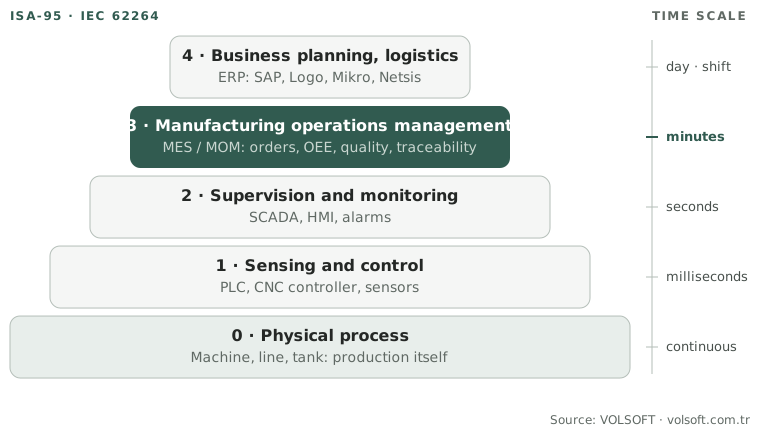
The ISA-95 standard (internationally IEC 62264) is used to describe how plant systems relate to each other. It divides a manufacturing site into five levels:
| Level | What happens | Typical systems |
|---|---|---|
| 4 – Business planning and logistics | Orders, inventory, purchasing, cost, production plan | ERP (SAP, Logo, Mikro, Netsis) |
| 3 – Manufacturing operations management | Executing work orders, records, quality, maintenance, traceability | MES / MOM |
| 2 – Supervision and monitoring | Monitoring machines and process, alarms, operator interface | SCADA, HMI |
| 1 – Sensing and control | Reading sensors, controlling motors and valves | PLC, CNC controller |
| 0 – Physical process | Production itself | Machine, line, tank |
Use this diagram
You may use this diagram free of charge on your site, in training or in presentations, as long as you credit and link the source. The code below does both.
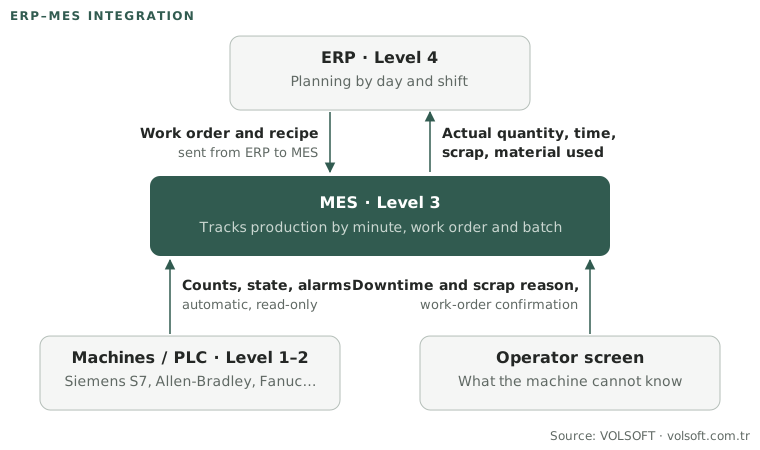
The MES connects the production plans made at Level 4 with the machine data coming from Levels 1–2. The ERP plans by day and shift; the PLC controls processes in milliseconds. The MES tracks production by minute, work order and batch. That is why two connections stand out in MES projects: machine data collection on the floor and ERP integration above it.
MES vs ERP
This is the most common question, because both systems talk about “production” and many ERPs have a production module.
| ERP | MES | |
|---|---|---|
| Core question | What, when and with which resources will we make? | What is being made right now, and how is it going? |
| Time scale | Day, week, shift | Minute, second, cycle |
| Data source | Orders, stock movements, manually entered slips | Machine signals, operator screens, barcode scans |
| Users | Planning, purchasing, accounting, management | Operators, shift supervisors, production and maintenance engineers |
| Typical output | Production plan, cost, inventory | OEE, downtime reasons, actual quantity, batch record |
The ERP’s production module opens the work order and records the actual quantity when the job is finished, but it does not follow what happens on the machine during production. The actual quantity is often keyed in at the end of the shift, and micro-stops, speed losses and the real reason for scrap are lost in that entry. The MES makes visible the part of production the ERP cannot follow.
MES integration with ERP
When MES and ERP are integrated, work orders and recipes are sent from the ERP to the MES. The MES starts and tracks production; actual quantity, time, scrap and material consumption are sent back to the ERP. How this flow is built with ERPs such as SAP, Logo and Mikro is described on our ERP–MES integration page.
Use this diagram
You may use this diagram free of charge on your site, in training or in presentations, as long as you credit and link the source. The code below does both.
MES vs SCADA
SCADA is the system where machines and processes are monitored live and operators can intervene when needed: tank levels, motor states and alarms, for example. The MES ties that data to production information: when the machine stopped, which work order was running, which product and batch were being made, which shift was on?
An example: SCADA shows that an injection molding machine stopped at 14:05 and restarted at 14:22. The MES shows which work order those 17 minutes were booked to, that the operator chose “mold change” as the downtime reason, and how that affected the shift’s OEE. The two systems do not replace each other; the MES often uses data from SCADA or straight from the PLC.
Signs your plant needs an MES
An MES is not a software purchase but a decision about how production is managed. If you often hear these sentences in your plant, a production tracking system or an MES will pay off:
- “The count on the shift report doesn’t match what went into the warehouse.”
- “Nobody really knows why the machine stopped; the form always says ‘other’.”
- “We calculate OEE in Excel, but nobody trusts the number.”
- “When a customer asks which raw material a batch was made from, we dig through paper.”
- “Planning finds out the line is behind schedule the next day.”
- “Every line lead keeps their own spreadsheet, and the numbers never match in the management meeting.”
What these have in common is data that arrives late, incomplete or by hand. The MES’s first job is to take that data from the machine automatically and correctly; everything else is built on it.
How to implement an MES, step by step
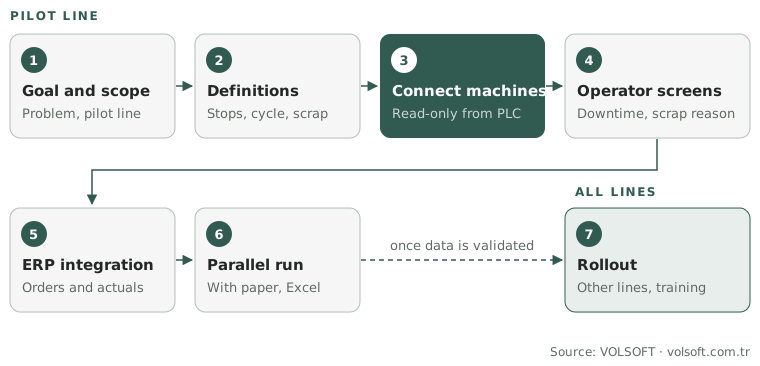
The success of an MES project depends less on the software than on the decisions made before installation. This is the order we follow in our projects:
- Goal and scope: Which problem are we solving (downtime, traceability, schedule adherence)? Which lines are in the first phase? Starting with a single pilot line lowers risk and shortens the rollout.
- Written definitions: What counts as planned downtime, what is the ideal cycle time per product, how is scrap counted, which items make up the downtime reason list? These definitions are written down together with production, maintenance and planning. An OEE with vague definitions becomes an argument after go-live.
- Machine connectivity: Counts, machine state and, where needed, process values are read from the PLC or CNC. Data is read from controllers such as Siemens S7, Allen-Bradley, Mitsubishi, Omron and Fanuc in read-only mode; the machine program is not touched.
- Operator screens: The operator enters only what the machine cannot know: downtime reason, scrap reason, work-order confirmation. The simpler the screen, the more accurate the data.
- ERP integration: Work orders coming down from the ERP and actuals going back up are connected. Starting one-way (receiving work orders only) is also possible in the first phase.
- Parallel run: On the pilot line the system runs for a while alongside the existing paper or spreadsheet tracking. Differences are investigated; this is usually when the gaps in the old records become visible.
- Rollout: The validated setup moves to the other lines, and users are trained on their own screens.
Use this diagram
You may use this diagram free of charge on your site, in training or in presentations, as long as you credit and link the source. The code below does both.
At VOLSOFT we build MES and OEE on Proxus: machine connectivity, downtime and count logic, alarms and dashboards run on one platform, and the data stays on the customer’s own server. See our MES and OEE implementation page for details.
From the field: what we often see in MES projects
- The real need is usually visibility. In most conversations that start with “we want an MES”, the first need is to see when and why machines stop. That is why we recommend starting not with a full package but with machine connectivity, downtime tracking and OEE. The OEE monitoring and alarm system we built for Doğadan’s tea packaging machines was such a start; predictive maintenance was planned as the next phase.
- OEE without written definitions creates arguments. If planned downtime and the ideal cycle time per product are not settled up front, the conversation after go-live is about whether the number is right, not about production. We write these definitions down with production, maintenance and planning before installation.
- The operator screen must be simple. Operators enter only what the machine cannot know: downtime reason, scrap reason, work-order confirmation. The longer the downtime reason list, the bigger the “other” option gets; a short list fitted to the floor directly raises data reliability.
- A parallel run exposes the gaps. When the system runs side by side with paper or spreadsheet tracking for a while, most of the differences come from micro-stops and speed losses that never showed up in the old records.
Questions to ask when choosing an MES
Before comparing products, these questions should have clear answers:
- Can it get data from my machines? Which PLC and CNC brands, and which protocols (OPC UA, Modbus, Siemens S7, MQTT), can it talk to directly? What does it propose for older machines?
- How does it talk to our ERP? Is there a ready connector, or is everything custom? How are work orders, recipes and feedback set up?
- What happens when the internet goes down? Do data collection and operator screens on site keep working, or is data lost?
- Who can change the definitions? Do we depend on the vendor for a new downtime reason, a new product or a new shift pattern?
- Who owns the data? Can we reach the raw data with our own reporting tools?
- Can we start in phases? Is it possible to start with one line and one module and grow?
The answers to these questions matter more than the software’s brand.
Conclusion
An MES is the production management layer that closes the gap between the ERP’s plan and what really happens on the machine. Its value comes not from a large software package but from data that arrives from the machine automatically and correctly. The soundest start is therefore clear definitions, a single pilot line and machine connectivity. OEE, downtime tracking and work-order tracking are built on that foundation; quality and traceability are added when the need appears.
Related guides: MTBF and MTTR: how to calculate them, What is OEE.
If you want to talk through where it makes sense to start in your plant, talk to one of our engineers.