Service
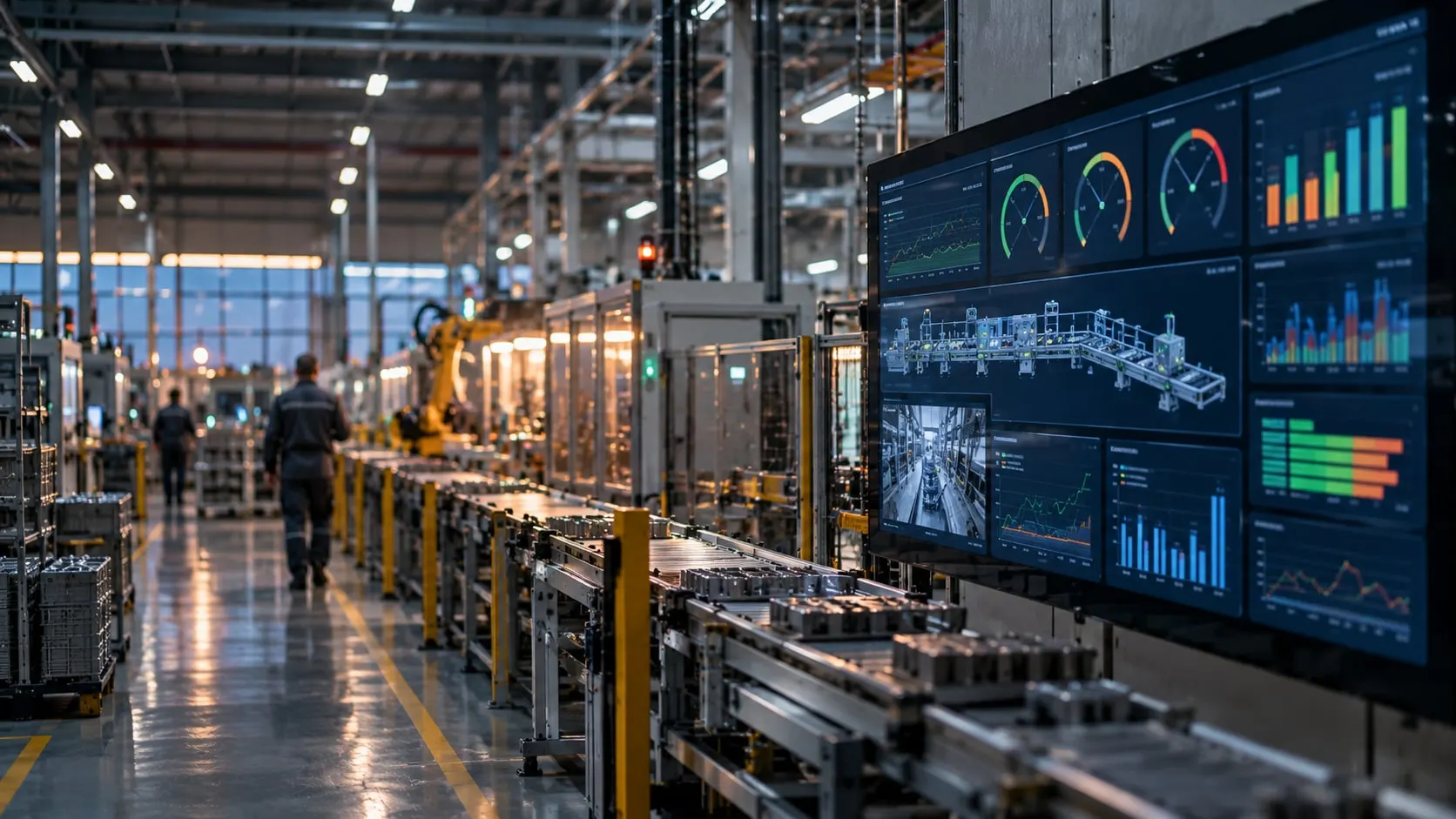
Production dashboards and reporting
From the line-side screen to the management report, every view is fed by the same data. We work alongside existing SCADA and historian systems instead of ripping them out.
Our clients
- Siemens

- Anadolu Isuzu

- BSH
- Tofaş

- Toyotetsu

- Martur

- Turkcell

- Vodafone

- Doğadan

- Pakmaya

- Bross

- Abdi İbrahim

- Nobel İlaç

- Plastimak

- Dalgıç Kalıp

- Barbaros Motor

- Magneti Marelli

- Rözmaş

- Sanel

A good dashboard tells the viewer what to do next. For the line operator that is the active job, status against target and the reason for the last stop; for the shift supervisor, losses by line; for the plant manager, trends and Pareto charts. Showing everyone the same screen usually produces a screen no one looks at.
The reporting problem we meet most often is a spreadsheet an engineer rebuilds every morning: no report on weekends or holidays, formulas that drift, and no one sure which version is right. We build reports from the data model, with defined formulas and automatic distribution.
Many plants already run a SCADA or historian that works well. Rather than replace it, we read from it over OPC UA, its database or its own interfaces and combine it with MES, ERP and reporting. Working with Siemens, we built meter reading, invoicing and third-party integrations for the utility network SCADA project of an industrial zone in Türkiye.
What we deliver
Dashboards and Reporting
-
Line-side screens
Simple screens readable from a distance are designed for shop-floor TVs and operator panels: target, actual, state and last stop reason. Colors and alerts change only when someone needs to act.
-
Shift and management reports
OEE, output, scrap, downtime Pareto and energy reports by shift, day, week and month are generated automatically and distributed by email.
-
Alarms and notifications
Long stops, deviations from target or process limit breaches notify the right person. Rules are kept few and meaningful to avoid alarm fatigue.
-
SCADA and historian integration
Data from existing SCADA and historian systems is read over OPC UA, SQL or the system’s own interfaces. The existing investment is kept and data joins a single model.
-
Export and BI
Data can be exported on a schedule to corporate BI tools such as Power BI and to databases. Corporate reports then use the same defined KPIs.
How a project runs
From discovery to live, step by step
- 01
Users and decisions
For each role we identify which decisions are made with which data. Existing reports and SCADA screens are reviewed.
- 02
Connect data sources
Machine data, MES records and existing SCADA/historian data are combined in one data model.
- 03
Screen and report design
Screens and reports are refined with their users from draft to final; KPI definitions are written down.
- 04
Publish and iterate
Screens go live on the floor and reports go to distribution lists. Early user feedback drives adjustments.
Built on Proxus
Dashboards, reports and alarms run on Proxus dashboards and its historian. Existing SCADA and historian systems are read through Proxus drivers and joined in the same Unified Namespace.
Proxus is the industrial data platform built by the VOLSOFT team.
Frequently asked questions
Common questions
What is a production monitoring system?
A production monitoring system shows and reports live machine state, output and downtime on screens and in reports. Data is collected automatically from machines and used on line-side displays and management reports. It is the monitoring and reporting side of an MES.
Do we need to replace our SCADA?
No. Existing SCADA or historian systems are read over OPC UA, their database or their own interfaces and combined with other data. SCADA keeps controlling the process; plant-wide visibility and reporting are added on top.
What do SCADA integration services include?
SCADA integration services typically cover reading tags and alarms from the SCADA, mapping them into a common data model, and connecting them to MES, ERP, historians or BI. They may also include meter reading and third-party system interfaces, as in utility networks.
Can reports feed Power BI?
Yes. Data is exported on a schedule to a database or service that Power BI and similar tools can read. What matters is that corporate reports use the same defined KPI calculations.
Related pages
Often looked at together
- Solution OEE Software OEE software fed by PLC and CNC data, with downtime reasons, work orders and ERP sync. Explore →
- Solution Energy Monitoring Meter and analyzer data turned into energy per unit, EnPIs and ISO 50001 reporting. Explore →
- Solution Process Monitoring Process values tracked by recipe and batch, with SPC, alarms and batch reports. Explore →
- Industry Energy and utilities SCADA integration and meter reading for substations, industrial-zone grids and solar plants. Explore →
- Technology OPC UA integration Connecting to OPC UA servers with security modes and certificates, node selection and data modeling. Explore →

Next step
Let’s turn your goal into a clear engineering scope.
Tell us about your plant, your machines and your goal. An integration engineer will set up a discovery call with you.