Machine data
PLC data collection: how to read data from Siemens, Allen-Bradley, Mitsubishi and Omron PLCs
How PLC data collection works: protocols for Siemens S7, Allen-Bradley, Mitsubishi and Omron, OPC UA and Modbus options, data types and read-only access.
Volkan Alkılıç ·
Our clients
- Siemens

- Anadolu Isuzu

- BSH

- Tofaş

- Toyotetsu

- Martur

- Turkcell

- Vodafone

- Doğadan

- Pakmaya

- Bross

- Abdi İbrahim

- Nobel İlaç

- Plastimak

- Dalgıç Kalıp

- Barbaros Motor

- Magneti Marelli

- Rözmaş

- Sanel

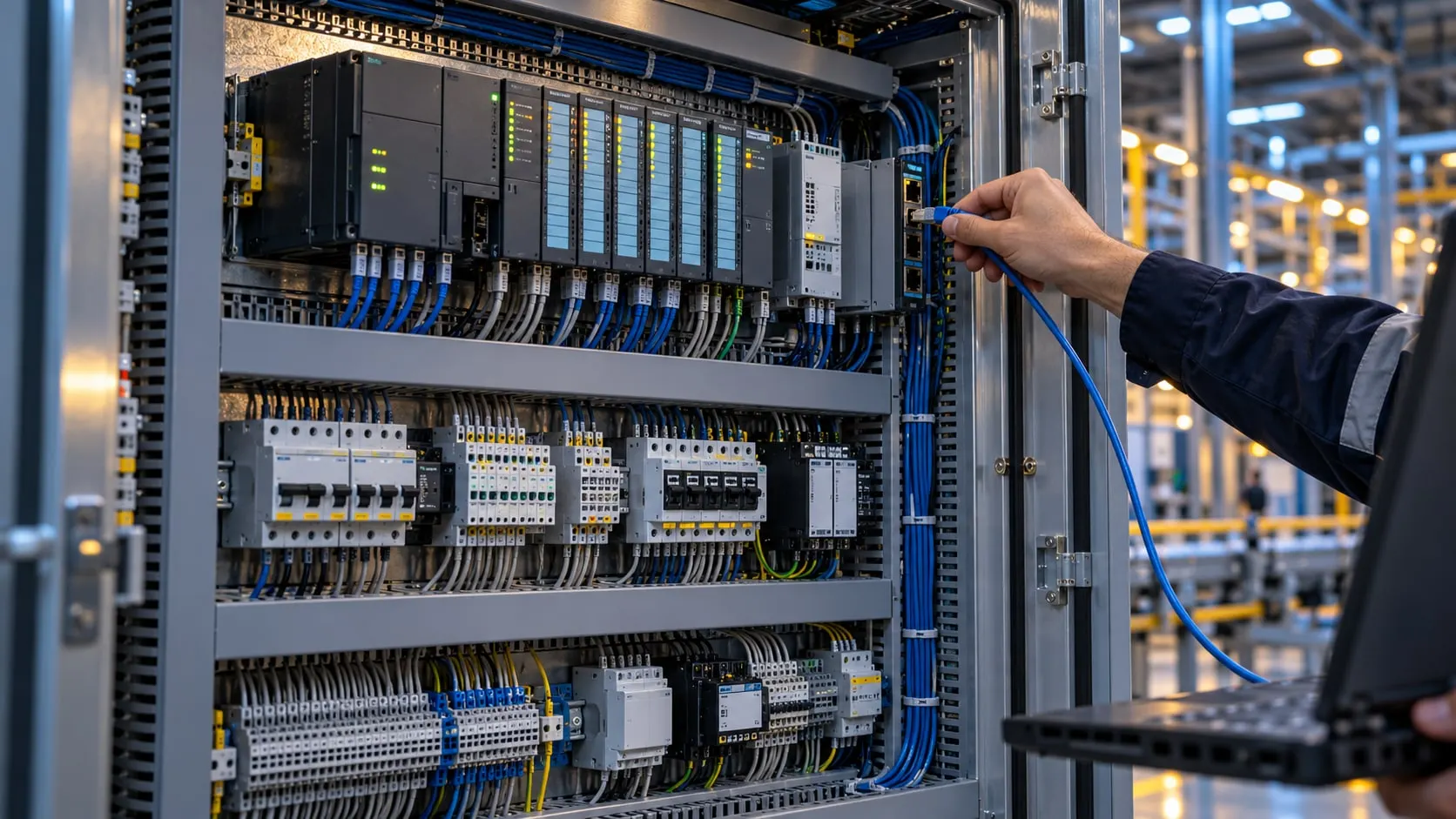
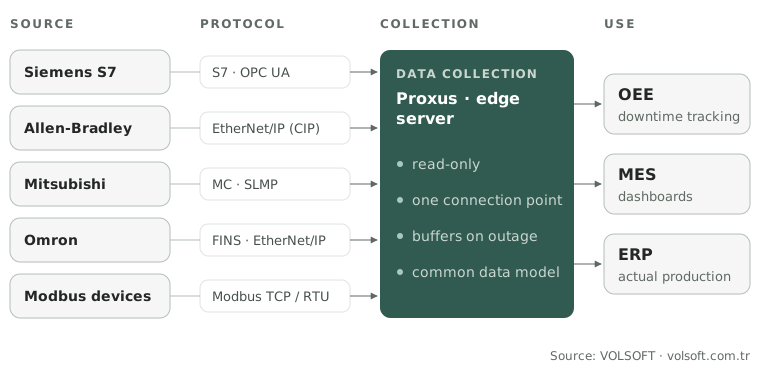
PLC data collection means reading data from the PLC over its Ethernet or serial port, in read-only mode, using a protocol the brand supports. The most common methods are the S7 protocol or OPC UA on Siemens, EtherNet/IP on Allen-Bradley, the MC protocol (SLMP) on Mitsubishi and FINS on Omron; Modbus TCP is a shared option across many brands. Configured correctly, data can be read without changing the PLC program and without stopping production; the PLC keeps running as before.
This guide covers how to read data from Siemens, Allen-Bradley, Mitsubishi and Omron PLCs, which data to read, common data-type mistakes and the options for older machines. The same job is also called PLC data acquisition or PLC data logging.
Why collect data from the PLC?
The machine’s running state, part counts, active alarms, temperature and pressure can all be read from the PLC. When this information is recorded by hand, it arrives late and incomplete; micro-stops and speed losses are often never written on the form. Data read automatically from the PLC is the basis for:
- OEE and production monitoring: automatic OEE from running, downtime and count data
- Downtime tracking: when a stop starts and ends, to the second
- Predictive maintenance: trends in values such as current, vibration and temperature
- Sending actual production to the MES and ERP
Which data do you read?
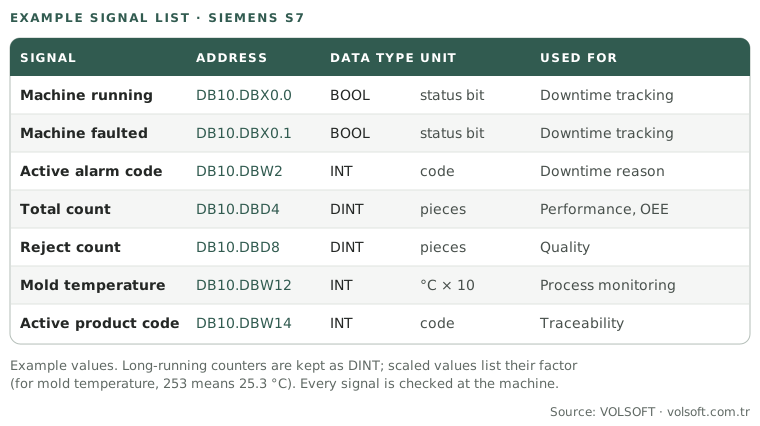
A PLC can hold thousands of addresses; you do not need them all. The work starts with a signal list: which data will be read, what its address in the PLC is, and what its data type and unit are. A typical signal list has these groups:
| Group | Example signals | Used for |
|---|---|---|
| Machine state | Running, stopped, faulted, auto/manual mode | Downtime tracking, availability |
| Counters | Total count, good count, reject count, cycle count | Performance, quality, work-order tracking |
| Alarms | Active alarm code or alarm bits | Finding the downtime reason automatically |
| Process values | Temperature, pressure, speed, current, cycle time | Process monitoring, predictive maintenance |
| Product and recipe | Active product code, recipe number, mold number | The right ideal cycle time, traceability |
The most reliable way to build the signal list is to go through the addresses and variables in the machine’s automation project. If there is no project, a backup of the PLC program is taken and the addresses are worked out from it. Every signal found is then checked at the machine.
Use this diagram
You may use this diagram free of charge on your site, in training or in presentations, as long as you credit and link the source. The code below does both.
Download the free PLC signal list template (Excel) to prepare your own list.
How to read data from Siemens, Allen-Bradley, Mitsubishi and Omron PLCs
| Brand and series | Common method | Watch out for |
|---|---|---|
| Siemens S7-300 / S7-400 | S7 protocol (S7comm), over Ethernet or a CP module | Addresses are read as absolute (DB, M, I, Q) |
| Siemens S7-1200 / S7-1500 | S7 protocol (PUT/GET) or the built-in OPC UA server | PUT/GET permission and optimized block access settings |
| Allen-Bradley ControlLogix / CompactLogix | EtherNet/IP (CIP), reading by tag name | Tag names and program vs controller scope |
| Allen-Bradley MicroLogix / SLC 500 | PCCC (over EtherNet/IP or DF1 serial) | File-based addressing (such as N7, F8) |
| Mitsubishi iQ-R / iQ-F / Q / L | MC protocol (MELSEC Communication) or SLMP | Opening the communication port in the Ethernet settings |
| Omron CJ / CS / CP | FINS (UDP or TCP) | Node numbers and memory areas (D, W, H) |
| Omron NJ / NX | Tag access over EtherNet/IP, OPC UA on some models | Variables must be published to the network |
| Many brands and devices | Modbus TCP or Modbus RTU | Register map and byte/word order |
Siemens S7
The most common way to read data from a Siemens PLC is to access data blocks (DB) and memory areas over the S7 protocol. On the S7-300 and S7-400 this works directly. On the newer Siemens S7 generation, the S7-1200 and S7-1500, two settings matter:
- PUT/GET access: In the device settings, “Permit access with PUT/GET communication from remote partner” must be enabled.
- Optimized block access: If optimized access is enabled on the data block to be read, it cannot be read by absolute address (such as DB10.DBD4). Either optimized access is turned off for that block, or a method with symbolic access is used.
These two settings do not change the machine logic, but the new configuration has to be downloaded to the PLC. Changes should therefore be planned with the automation team and applied during a planned stop.
The S7-1500 and S7-1200 models with newer firmware also have a built-in OPC UA server. With it, data can be reached by variable name, including variables in optimized blocks. The OPC UA server needs a Siemens runtime licence, and the variables to expose are defined in TIA Portal.
Allen-Bradley (Rockwell)
On Allen-Bradley ControlLogix and CompactLogix PLCs, data is read over EtherNet/IP with the CIP protocol, directly by tag name. No separate address table is needed; a tag name such as “Line1_GoodCount” is enough. Reading requires no change to the PLC program. Whether a tag is defined at controller scope or program scope determines the path used to read it.
On the older MicroLogix and SLC 500 families, addressing is file-based (N7:0, F8:1 and so on) and reads are done with PCCC commands over Ethernet or a DF1 serial link.
Mitsubishi
On Mitsubishi MELSEC PLCs (iQ-R, iQ-F, Q and L series), the standard route is the MC protocol or the compatible SLMP. Devices such as D (data registers), M (internal relays) and X/Y (inputs/outputs) are read with it. Before reading, the communication port for the external connection must be opened in the PLC’s Ethernet settings. This parameter change is made in GX Works.
Omron
On Omron CJ, CS and CP series, the most common method is the FINS protocol; memory areas such as DM (D), W and H are read over UDP or TCP. Every device on the network has a FINS node number, and these numbers must not clash. On the newer NJ and NX series, variables can be read by tag name over EtherNet/IP; the variable has to be published to the network for that. Some NJ/NX models also offer a built-in OPC UA server.
Modbus TCP and RTU
Modbus is the most widespread brand-independent industrial protocol. Many PLCs, energy analyzers, drives and sensors speak Modbus TCP (Ethernet) or Modbus RTU (RS-485 serial). In Modbus, data is read by register number, so you need the device’s register map. On PLCs the Modbus server function often has to be enabled separately, and you have to define which data is written to which register.
OPC UA or the PLC’s own protocol?
| The PLC’s own protocol (S7, CIP, MC, FINS) | OPC UA | |
|---|---|---|
| Needed on the PLC side | Usually a small communication setting | Built-in server (and its licence) or an external OPC UA server |
| Addressing | Address-based on most brands; tag-based on Allen-Bradley and Omron NJ/NX | Browsable structure with names and types |
| Security | Varies by protocol; most have no encryption | Authentication and encryption support |
| When it fits | Older, mixed-brand machine fleets, a quick start | Newer PLCs, when a standard and secure connection is needed |
The two are not rivals. In one plant, older machines can be read with their own protocols and newer machines over OPC UA. The collected data is then mapped to a common data model on a single platform.
Common data-type mistakes
For the data read from the PLC to be interpreted correctly, its data type has to be defined correctly. The mistakes we see most on site:
- Overflowing counters: A 16-bit INT counter resets or turns negative when it reaches its limit. Total count calculations must account for that overflow; DINT is preferred for counters that keep rising for a long time.
- Wrong decimals: A REAL temperature read as an INT gives a meaningless number. Some PLCs store the value as a scaled integer (for example 253, which is actually 25.3 °C), and you need to know the scale factor.
- Byte and word order: In Modbus especially, 32-bit values are split across two registers. If you do not know which order the device uses, the values come out completely wrong.
- Bit addresses: Reading a bit inside a word (such as the “machine faulted” bit) from the wrong address silently produces wrong downtime records.
That is why every signal is checked against the real value at the machine after the first read.
Older machines and machines without communication
Not every machine has a newer PLC with an Ethernet connection. For older machines there are three routes:
- Serial communication: Serial protocols such as MPI/PPI on the S7-200 and S7-300 or DF1 on older Allen-Bradley are brought onto Ethernet with a protocol converter or gateway.
- Add-on communication module: An Ethernet or Modbus module can be added to some PLCs.
- Reading digital signals: On machines with no communication at all, a “running” signal, a count pulse and a fault signal are read with a separate input module. For downtime tracking and part counting that is often enough.
Safe data collection: without affecting production
The basic rule when reading PLC data is that the machine’s operation must not be affected in any way:
- Read-only: The data collection system does not write to the PLC; it only reads. If writing is needed (for example sending the work-order number to the machine), it is designed separately and tested with the automation team.
- Polling rate: Not every signal needs to be read every millisecond. For states and counters, a rate in the order of seconds is usually enough. Polling more often than needed adds communication load on the PLC.
- Number of connections: A PLC accepts a limited number of simultaneous connections. Instead of every screen and application connecting to the PLC separately, data should be collected at one point and distributed from there.
- Network separation: The machine network and the office network are kept apart, and the data collection software acts as a controlled bridge between them. For this, data collection runs on an edge server on site, close to the machines.
- No data loss during outages: When the network connection drops, data must be stored locally and forwarded once the connection is back. Otherwise reports end up with missing records.
How VOLSOFT collects PLC data
Our machine data collection projects start with the signal list: which data is read from which machine, and for what purpose. Each PLC is then connected read-only, with its own protocol or with OPC UA, and every signal is checked at the machine. The data is collected on the Proxus platform on a server in the plant, mapped to the same model and used for OEE, downtime tracking, MES and ERP integration. We do not touch the PLC program; we plan the necessary communication settings together with the customer’s automation team.
Use this diagram
You may use this diagram free of charge on your site, in training or in presentations, as long as you credit and link the source. The code below does both.
From the field: what we often see when connecting PLCs
- The signal list is half the project. In a plant that has the automation project at hand, the signal list comes together quickly. Without a project, the addresses are worked out from a PLC backup and every signal is checked by watching the machine; skipping this step comes back weeks later as a wrong counter or an inverted status bit.
- Meaningful names instead of raw addresses. We model collected data not with addresses like DB10.DBW4 or D200, but with meaningful names in a site, line, machine and signal hierarchy. That way data from different PLC brands can sit side by side in the same report.
- Read-only and buffering by default. We do not touch the PLC program when collecting data. Every connection runs through Proxus; when the network or server drops, data is buffered on site and forwarded when the connection returns.
- From our projects: At Anadolu Isuzu, data was collected from production equipment and energy systems; at Bross, the machine data collection and reporting system we set up was used to track waiting times and delays in production.
Conclusion
Reading data from a PLC is work that can be done without affecting production, given the right protocol and the right signal list. The S7 protocol or OPC UA on Siemens, EtherNet/IP on Allen-Bradley, the MC protocol on Mitsubishi and FINS on Omron are the most common routes; Modbus is the shared, brand-independent language. The real effort is in settling which data to read and checking every signal against its real value at the machine. Once that foundation is solid, OEE, downtime tracking and MES all run reliably on the same data.
Related guides: What is a production tracking system, Predictive maintenance.
If you want to talk through how to get data from the PLCs in your machine fleet, talk to one of our engineers.