Production monitoring
What is a production tracking system? Moving from paper forms and Excel to machine-connected tracking
What a production tracking system records, what a tracking form needs, and the pros and cons of paper, Excel, barcode and machine-connected tracking.
Volkan Alkılıç ·
Our clients
- Siemens

- Anadolu Isuzu

- BSH

- Tofaş

- Toyotetsu

- Martur

- Turkcell

- Vodafone

- Doğadan

- Pakmaya

- Bross

- Abdi İbrahim

- Nobel İlaç

- Plastimak

- Dalgıç Kalıp

- Barbaros Motor

- Magneti Marelli

- Rözmaş

- Sanel


A production tracking system records which job is running on which machine, how many good and defective parts were made, and when and why the machine stopped. The record can be kept on a paper form, in an Excel sheet, with a barcode scanner or by software that reads data directly from the machine. Whichever you choose, the goal is the same: to see the gap between planned and actual production, and the reason for it.
This guide covers what a production tracking system should record, the fields a production tracking form needs, the pros and cons of four tracking methods, when Excel stops being enough and how to move to automatic tracking.
What does a production tracking system track?
Whatever the method, good production tracking answers four questions:
- What was made? Work order, product code, machine or line, shift and operator.
- How much was made? Total quantity, good quantity and scrap quantity.
- How long did we stop? The start, end and reason of every stop: breakdown, mold or product changeover, waiting for material, adjustment, planned maintenance.
- Why did we make scrap? The scrap count alone is not enough; without the reason (out of tolerance, flash, color, material defect) nothing can be improved.
Put these four together with the ideal cycle time per product and the same data gives you OEE. In short, the data collected for production tracking is also the foundation of every efficiency calculation. If that data is incomplete or wrong, every report and KPI built on it is wrong too.
Sample production tracking form: which columns should it have?
The information a production tracking form needs is largely the same on paper and in Excel. The list below is a good starting point for a form kept per shift:
| Column | What it holds |
|---|---|
| Date and shift | Which shift the record belongs to |
| Machine / line | Machine code or line name |
| Operator | The person keeping the record or running the machine |
| Work order no. and product code | The ERP work order and the product being made |
| Start and finish time | When the job started and finished on the machine |
| Total quantity | All parts coming off the machine |
| Good quantity | Parts that passed quality control |
| Scrap quantity and reason | Number of defective parts and type of defect |
| Stop start, end and reason | One row per stop |
| Notes | The shift supervisor’s comment |
Two things matter when you set up this form. First, the lists of downtime and scrap reasons should be short and clear. When there are too many options, operators usually go for the easiest one and pick “other”. Second, the definitions should be written down: is a tea break a stop, is a mold change planned, do trial parts count as scrap? If these are not settled up front, the same machine’s results are calculated differently on different shifts.
You can download a free production tracking and OEE form (Excel) built with these columns, which also calculates OEE.
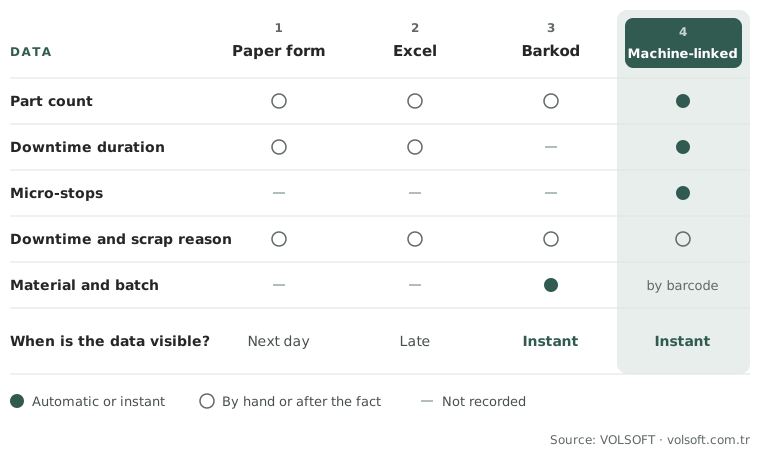
From paper to machine: four production tracking methods
Plants usually develop their production tracking in the order below. Each method fixes the gaps of the one before, but it can bring extra cost and changes to working habits.
1. Paper production tracking form
The operator or shift supervisor fills in the form during the shift. The data is then typed into a system or the form is filed.
- Pros: No investment, can start immediately, easy to use.
- Cons: Data is written after the fact and relies on estimates. Micro-stops are usually not written down at all. Forms get lost or are unreadable, and collecting and reporting them is a separate job. Numbers are visible the next day at the earliest.
2. Production tracking in Excel
Form data is typed into Excel, or the operator writes straight into a sheet. Plants that want to track production in Excel usually look for a ready-made production tracking template or program.
- Pros: Cheap and flexible; formulas can calculate OEE, scrap rate and downtime totals, and draw charts.
- Cons: Data is still entered by hand and late, so the accuracy problem of the paper form remains. When every line leader keeps a separate file, formulas and calculation methods drift apart. When several people use the same file, version confusion starts. The file slows down as it grows, and one wrong formula can break the whole report.
3. Barcode production tracking system
The operator scans the work order, the material or the product label to record when a job started and finished and which material was used.
- Pros: Records are instant and free of typing errors. It becomes traceable which batch was made with which material on which machine. Integration with warehouse and shipping is easier.
- Cons: A barcode does not know how long the machine ran or stopped. If a scan is forgotten, or done in bulk at the end of the job, the record still does not reflect reality. Quantities are often still entered by hand.
4. Machine-connected production tracking system
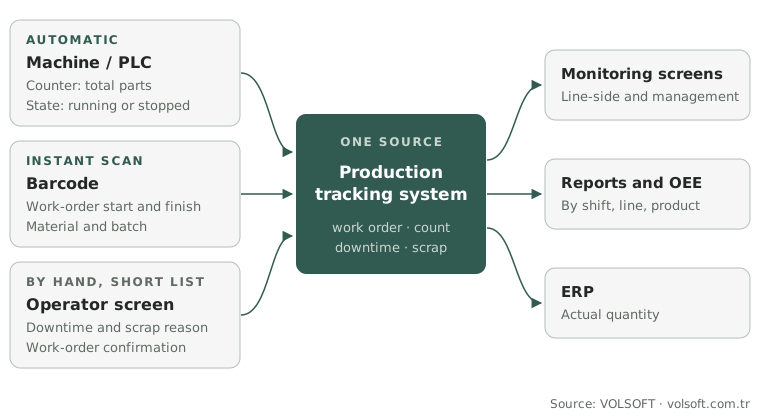
Count and machine state (running, stopped, in alarm) are read directly from the PLC or the CNC controller. The operator enters only what cannot be taken from the machine automatically: downtime reason, scrap reason and work-order confirmation.
- Pros: Quantities and stop durations are recorded automatically, to the second; micro-stops and speed losses become visible for the first time. Because the data is live, problems are noticed before the shift ends. The same data goes to screens, reports and the ERP from a single source.
- Cons: Setting up communication with the machines takes engineering work; older machines or machines without communication may need extra hardware. If the definitions (planned downtime, ideal cycle time, scrap) are not settled first, automatic data also produces disputed numbers. Operators need time to get used to the new screen.
Use this diagram
You may use this diagram free of charge on your site, in training or in presentations, as long as you credit and link the source. The code below does both.
These four methods are not mutually exclusive. In many plants, quantities and downtime come straight from the machine, material and batch data from barcode scans, and downtime and scrap reasons from the operator screen. We explain how data is taken from machines on our machine data collection page.
Use this diagram
You may use this diagram free of charge on your site, in training or in presentations, as long as you credit and link the source. The code below does both.
When does Excel stop being enough?
The problem is not Excel itself; it is that production data is recorded by hand. These signs show it is time to move from Excel to a production monitoring system:
- The quantity on the shift report regularly differs from what goes into the warehouse or is booked in the ERP.
- The most common value in the downtime reason column is “other”, or it is empty.
- OEE is calculated, but production, maintenance and planning do not trust the same number.
- Understanding the cause of a problem means merging files and digging through paper.
- You find out the line fell behind its target after the shift ended, or even the next day.
- When a customer or auditor asks for a batch’s history, the answer takes hours.
What these signs have in common is data that is late, incomplete or inconsistent. More complex Excel formulas will not fix that; taking the data directly from the machine, in real time, will.
How a production tracking system relates to MES
“Production tracking system” and “MES” (Manufacturing Execution System) are often used to mean the same thing on the shop floor. In fact production tracking is the most basic part of an MES: recording work orders, quantities, downtime and scrap. An MES adds dispatching work orders to machines, quality records, batch traceability, maintenance records and two-way data flow with the ERP.
In practice many plants start with a machine-connected production tracking system and OEE, and add MES functions such as work-order tracking and ERP integration once the data is reliable. That order is much less risky than installing a large software package in one go. We describe how we do it on our MES and OEE implementation page.
How to move from Excel to a production tracking system
Preparation decides the success of the move more than the software does. This is the order we follow in our projects:
- Review the current form and Excel. What you track today, which numbers are used and which nobody looks at define the scope of the new system.
- Write the definitions down. Planned downtime, ideal cycle time, scrap and the downtime reason list are agreed with production, maintenance and planning.
- Choose a pilot line. The line where the problem is felt most, or where the machines are easiest to connect, is a good start.
- Connect the machines. Count and state signals are read from the PLC in read-only mode; the machine program is not touched. A suitable way of taking signals from older machines is chosen.
- Keep the operator screen simple. The screen should show only the active work order, the production counter, downtime reason selection and scrap entry. Operators should finish in a few taps.
- Run in parallel for a while. The new system runs side by side with the existing form or Excel for a period. Differences are investigated; this is usually when the gaps in the old records come to light.
- Roll out to other lines and settle the reporting. The system validated on the pilot line is applied to the other lines, and dashboards and reports by shift, line and product go live.
If seeing downtime reasons systematically is the first goal, downtime tracking is a good starting scope.
From the field: what we see when plants move from Excel to a system
- The first differences come from micro-stops. During the parallel run, most of the gap between the paper or Excel record and the machine data comes from stops of a few minutes and speed losses that never made it onto the forms. Seeing that gap shows the team, in numbers, why the system is needed.
- Moving the form onto a screen is not enough. Putting the Excel columns on a screen as they are does not reduce manual entry. Taking count, run and stop data from the machine and asking the operator only for the reasons lowers both the workload and the error rate.
- Starting with one line convinces people. When the setup validated on the pilot line moves to other lines, there is less pushback, because the numbers are no longer an estimate but data the teams have seen on their own line.
- From our projects: At Bross, the machine data collection and reporting system we installed was used to analyze production gaps and delays; in their Clutch review the client reported a 15% increase in efficiency.
Conclusion
A production tracking system records work orders, quantities, downtime and scrap, and it is the foundation for measuring and improving production efficiency. Paper forms and Excel are good starting points, but as long as data is entered by hand and late, micro-stops, speed losses and scrap reasons stay invisible. A machine-connected system makes that data automatic and live, and the healthiest move is made with clear definitions, a single pilot line and a period of parallel running. See our OEE software page for details.
Related guides: MTBF and MTTR: how to calculate them, Predictive maintenance.
If you would like to talk about where it makes sense to start in your plant, talk to one of our engineers.